
• The forum software have been upgraded to the latest version.

    If you notice anything that looks off, or does not work, please let us know.

    For more information, click here.

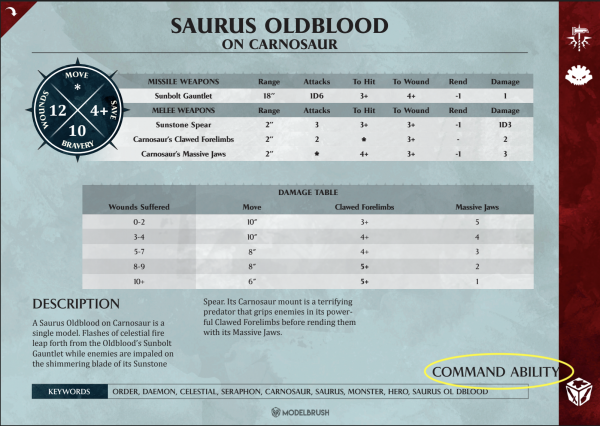
AoS Seraphon Warscrolls cards (A5 sized)

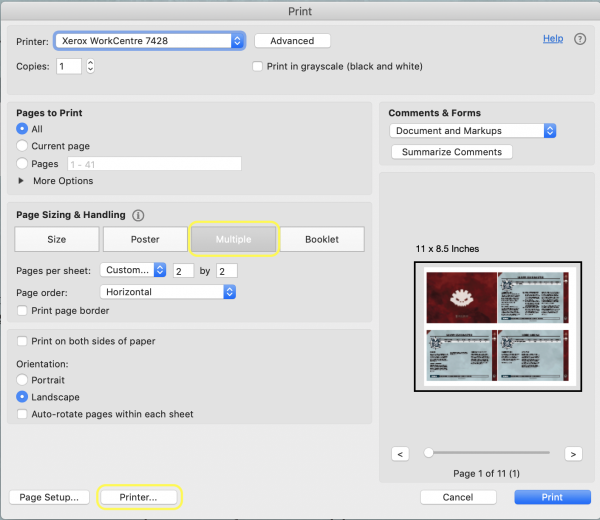
Choose «Poster» on the print screen in Adobe.

It's actually the Multiple tab, but thank you! It appears the Print as Image option degrades the clarity of the printout. So I test printed the default options and it's pretty good. Just wondering if any of the other options within the print dialogue might improve the clarity of the print out.
 
Mad thanks for that, I can finally pump out all my units onto easy to use cards!

Even better would be removing the "grey" parts, and inverting the unit circle so there's less black, and that right hand border as well.

(If I had the patience I'd go through and change all the stupid GW-original-character-do-not-steal nonsense like the ridiculous various weapon names. Just call them spears or maces etc!)
 
Found one more error in Ironjawz. Gore grunt as have a wound characteristic of 5. It says 2 on the cards.
 
The english warscroll for Saurus Guard and Saurus warrior is still the wrong way round, any chance this will be fixed?
 
Hey

We've just fixed the Saurus Guard and Warriors cards (there were some errors between them). You can download the fixed version in color and b/n.

Regarding the error of Ironjawz, we've fixed it too, thanks!!

Cheers
 
Just got done using these in a match.
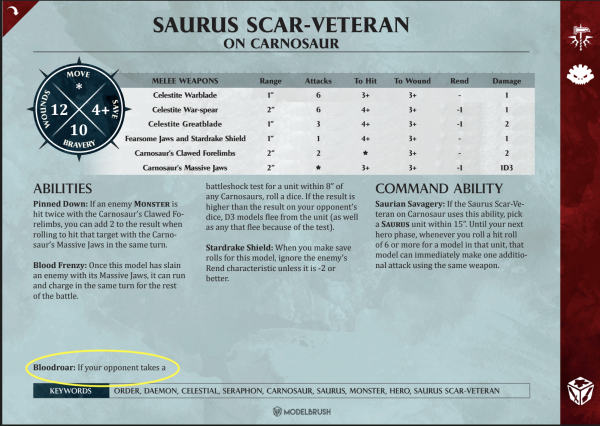
The Scar-Vet on Carno has the move and wounds switched. (wounds should be 12, move should be *)
 
Curious if anyone is using a binder, album, or other organizational tool to allow for quicker access to the card? I'm having a heck of time trying to find something for these so they aren't just loose on the table.
 
Curious if anyone is using a binder, album, or other organizational tool to allow for quicker access to the card? I'm having a heck of time trying to find something for these so they aren't just loose on the table.
I assume most people aren't playing with 20+ units at a time so it's easy enough to flip through the 4-5 cards you're actually using.
 
I assume most people aren't playing with 20+ units at a time so it's easy enough to flip through the 4-5 cards you're actually using.
In 2K, it's not hard to have 6-8 unit types in your army and then could be summoning in additional. Plus, it seemed an easier method or storage and organization.
 
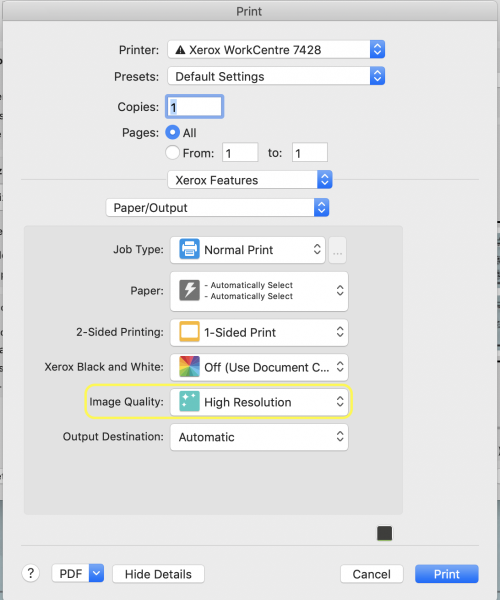
FYI, for anyone printing these using Adobe Acrobat Reader DC, I've found that if you select the High Resolution option within the printer options (this will likely vary, depending on the model printer you are using) that even at 2x2 on 8.5" x 11" paper.
Screen Shot 2019-05-02 at 9.25.29 AM.png Screen Shot 2019-05-02 at 9.25.45 AM.png
 
In 2K, it's not hard to have 6-8 unit types in your army and then could be summoning in additional. Plus, it seemed an easier method or storage and organization.
It's not hard, I just think most people probably don't play with more than 5-6 or so units.
 
Thanks!! we've just fixed it.

Cheers
Awesome. I found a two more corrections.

The Engine of the Gods has "dados" instead of "dice" on the Cosmic Engine table. As a suggestion, other units with tables use "D6" instead of the word "dice".

The Trogolodon's Drawn to the Screams has " ...within 1?2" of a screaming unit" instead of 1/2" (could also be written 0.5").
 
Last edited:
Awesome. I found a two more corrections.

The Engine of the Gods has "dados" instead of "dice" on the Cosmic Engine table. As a suggestion, other units with tables use "D6" instead of the word "dice".

The Trogolodon's Drawn to the Screams has " ...within 1?2" of a screaming unit" instead of 1/2" (could also be written 0.5").

Thanks for your suggestions. We've fixed the word "dados" and we've changed it for "XD6" as you say.

Regarding the Troglodon's rule, in this case we prefer keep the original format using the symbol ½.

Cheers
 
was trying to get 2 on one sheet in adobe to make laminating them easier but no joy so far
 
was trying to get 2 on one sheet in adobe to make laminating them easier but no joy so far
Did you try it in Adobe InDesign? Should be rather easy there.
 
Back
Top